Quick launch summary
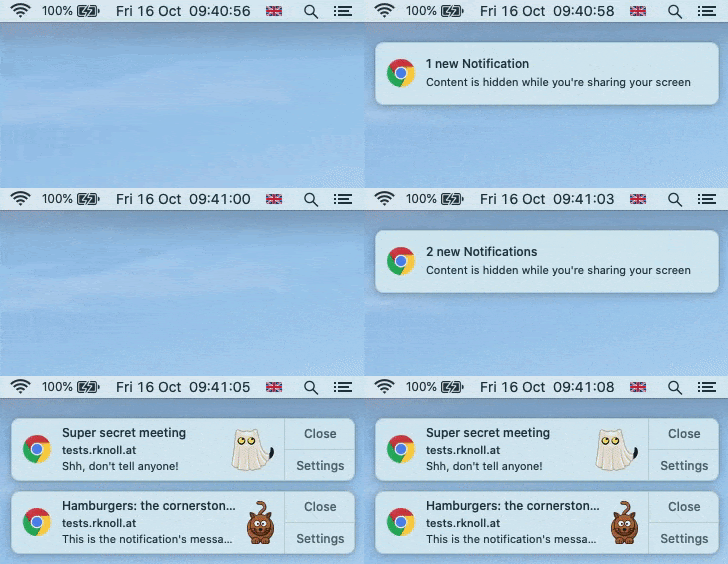
Notification content is hidden automatically while screen sharing.
Now when you're sharing your screen, Chrome will automatically hide the content of web pop-up notifications. This includes notifications from Google Chat, email notifications, and other third party websites.
When you're done sharing your screen, all muted notifications will be automatically displayed. Note that notifications are already muted when sharing a tab in Google Meet.
You'll see where the notification is from, but the content of pop-up notifications will be hidden. When you're done presenting, all muted notifications will be displayed.
There has been a dramatic shift in how many of us work — now more than ever, we're relying on Google Meet and other screen sharing solutions. We hope this feature will reduce distractions and prevent sensitive or personal information from accidentally being displayed while sharing your screen.
Getting started
Admins
There is no admin control for this feature. No action required on your end.
End Users
When sharing your screen, notification content will automatically be hidden. You can select "Show All" to display content for the current and future notifications.
Rollout pace
Full rollout (1–3 days for feature visibility) for Rapid & Scheduled Release domains starting January 25, 2021.
Availability
Available to the following Google Workspace plans:
- Essentials, Business Starter, Business Standard, Business Plus
- Enterprise Essentials, Enterprise Standard, Enterprise Plus
- G Suite Basic, Business, Education, Enterprise for Education, Nonprofits
- Users with personal Google Accounts
Questions about your Google Workspace setup?
Our team can help you get the most out of Google Workspace security features for your organisation.
Get in touch with Geeks on Tap